How it works FAQ Blog Get a free sample
日本語English
For restaurants

Multilingual QR menus + AI chatEvery guest, any language,gets your dishes

Turn the menu you already use into a multilingual QR menu and printed menus.Guests can ask about dishes in their own words.
Upload your current menu
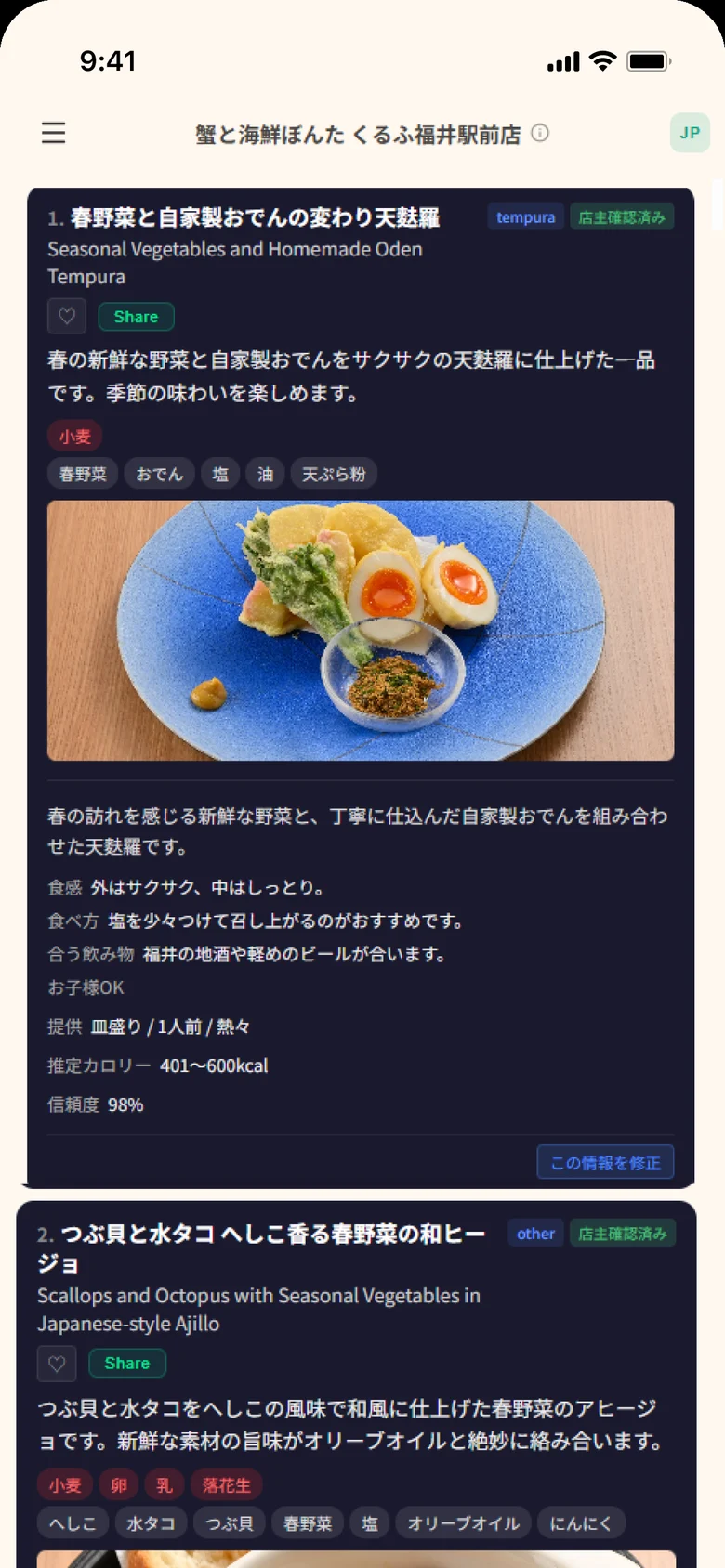
Actual dish card at Kani to Kaisen Bonta (Fukui): photo, texture, how to eat, drink pairing and serving style
Live screen at a restaurant using OmiseAI
01Menu on guests’ phonesFrom a QR at your table, in their language
02Printed menusOne per language, ready to hand out
03AI chatGuests ask about dishes themselves

How to get your sample

Consultation and samples are free. Just send your restaurant name and phone number.

Send your name and number

Right on this page

Enter your restaurant name and phone number in the form on this page.

We call you back

We explain how to send your menu

We call you and explain how to send photos or a PDF of the menu you use today.

Review your sample

Made from your own menu

We make a sample from your menu. See exactly how it looks on a guest’s phone.

From translated text
to a menu you can actually use.

AI can translate, but turning that into something your restaurant can use is where it stalls.

50–150 dishes across several languages

Asking, tidying and pasting each dish one by one adds up with every item.

A translation is not yet a usable menu

You still have to turn the text into QR pages and print-ready files.

Every menu update starts the work again

Even one seasonal change means translating and re-pasting again.
We take it past translation, all the way to a menu you can use.

This is what the published menu looks like

This is the page guests see when they scan the QR code.
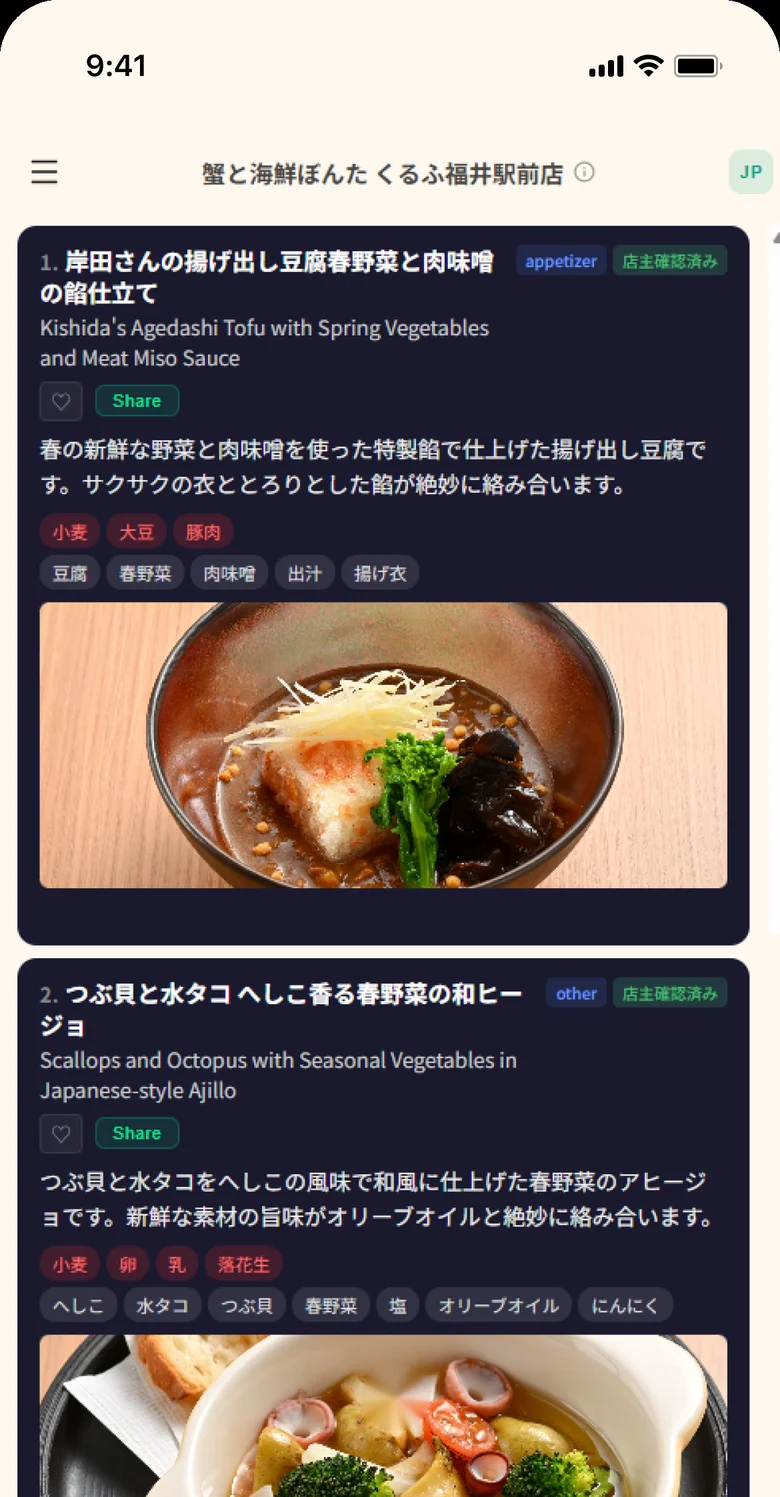
Actual menu screen at Kani to Kaisen Bonta (Fukui): dish photos, descriptions, allergens, ingredients and an owner-verified badge

Example restaurant: Kani to Kaisen Bonta, Fukui

When AI is not sure, it asks the owner.

AI reads and organizes your menu, then asks the owner only about the points it is unsure of. The owner just taps an answer on a phone.
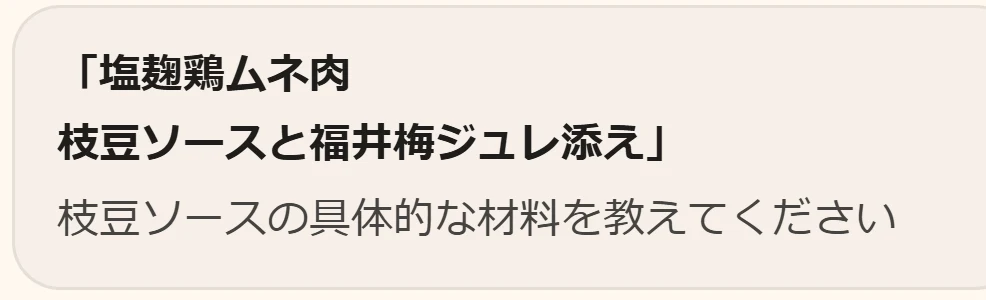
1

AI asks

AI question to the owner (in Japanese): what exactly is in the edamame sauce?

Only about what it could not read with confidence.

2

The owner taps

Answer choices: soybean, otherOwner answer: soybean

Pick a choice. “Other” is always available.

3

The dish is updated

Applied, undo

Applied right away, and it can be undone.

✓ Owner-verifiedAnswered by the owner
AI estimate — ask staff if unsureNot yet confirmed by the owner

Guests can always see which kind of information they are reading.
Owner screens are shown in Japanese, as used at Kani to Kaisen Bonta, Fukui.

Guests can ask in their own words.

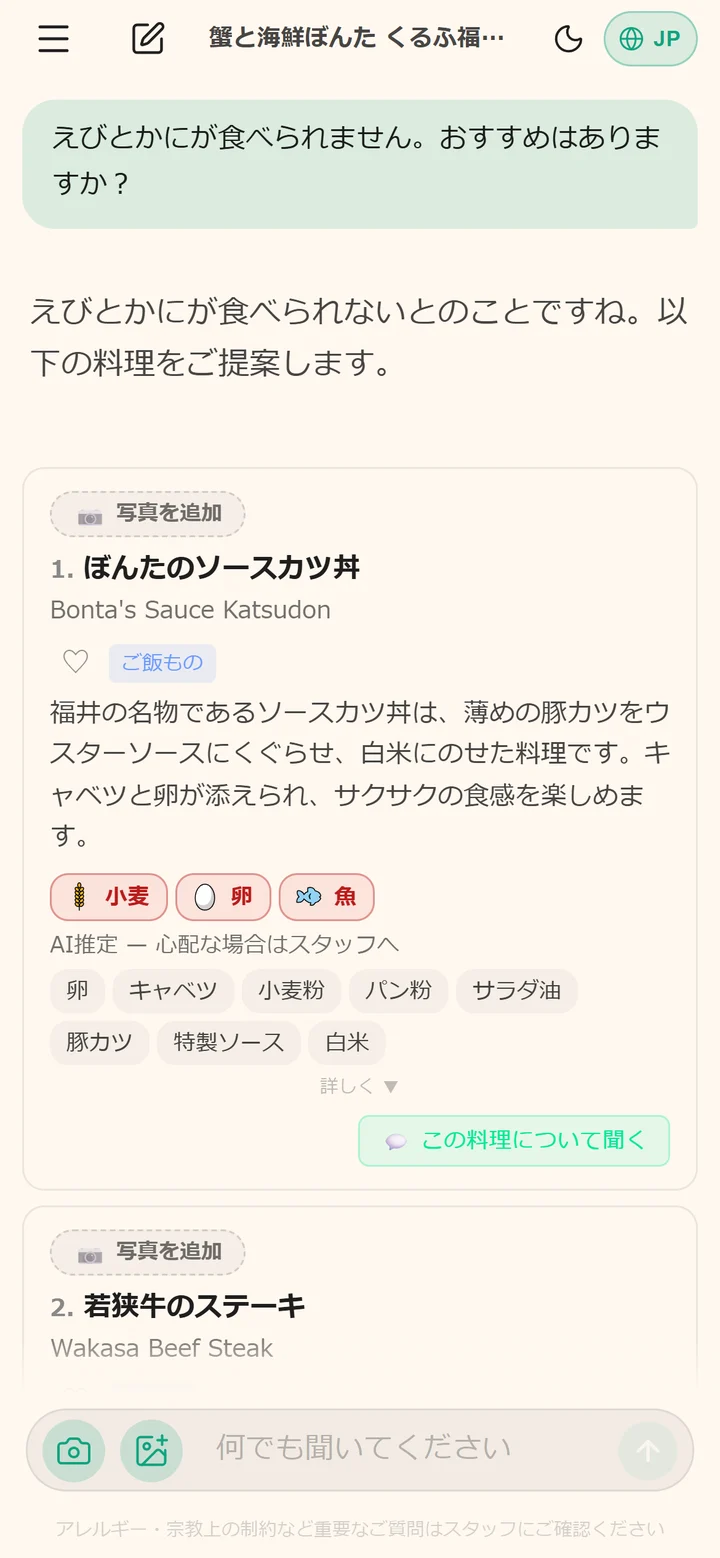
“I can’t eat shrimp or crab.” “What sashimi do you recommend?” Guests ask in their own language, and the chat suggests dishes from your menu.
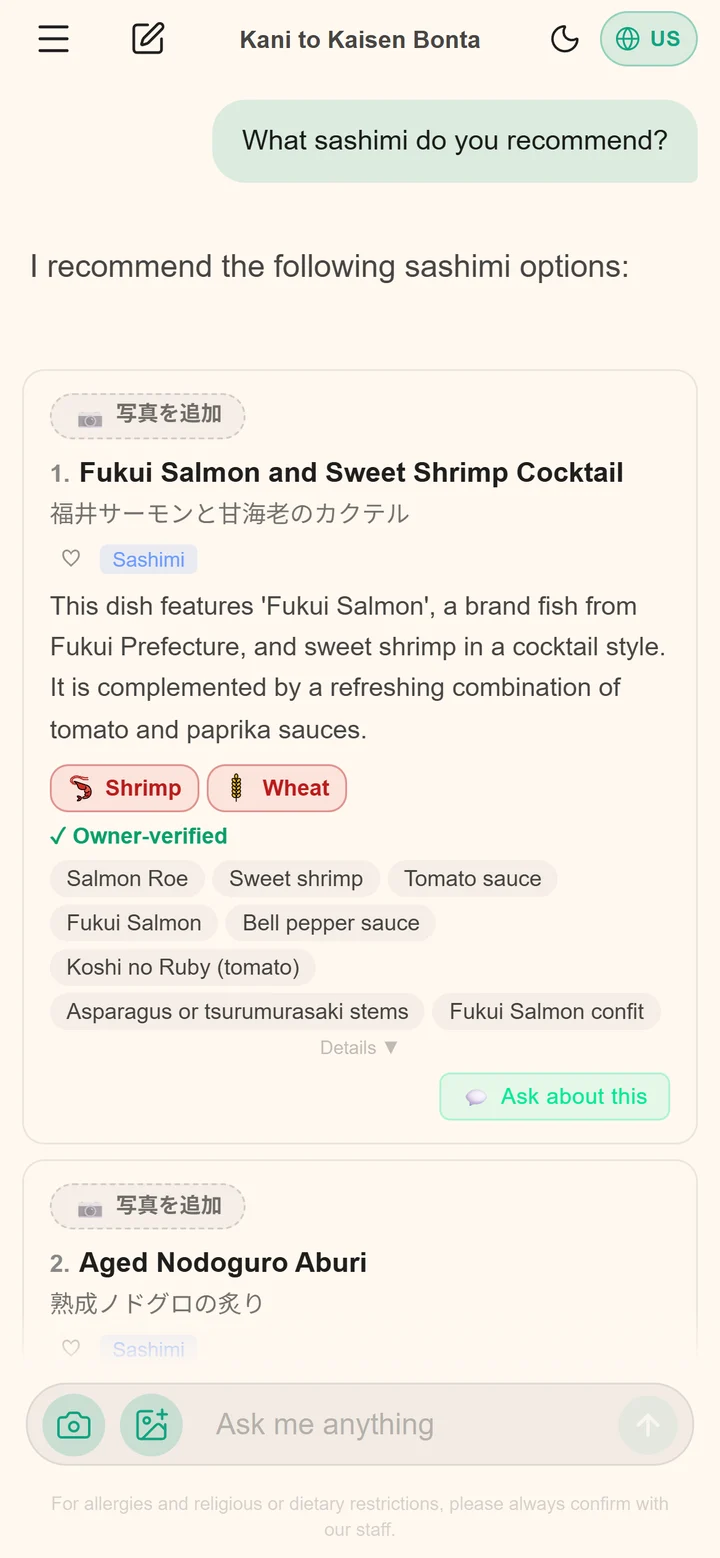
English chat: asking for sashimi recommendations and getting dish suggestions in English
Ask for recommendationsAsked and answered in English
Japanese chat: telling the restaurant about a shrimp and crab allergy and getting suggestions
Ask with an allergy in mindAsked in Japanese

Answers are based on the menu information registered by the restaurant. The screen reminds guests to confirm allergies and other important points with staff.
Screens are real conversations at a restaurant using OmiseAI (Kani to Kaisen Bonta, Fukui).

Allergies, religion and dietary style.

Guests choose their allergies, including Japan's eight mandatory allergens, and dietary styles such as halal, Hindu, vegetarian and vegan, in their own language.

Choose allergies, then scroll to dietary style

Allergen information is a general estimate. Every page asks guests to confirm important points with staff.
Screens shown are from a restaurant using OmiseAI (Kani to Kaisen Bonta, Fukui).

Once you are up and running

When your menu changes, just send the new one.

Send your menu

Photo or PDF

Send the menu you use today as a photo or PDF.

AI organizes it; you review

Dishes, ingredients, allergens

AI organizes dish names, ingredients and allergen notes, then localizes them. You can review everything.

Display the QR, print the menus

Ready the same day

Put the QR beside your current menu and print the menus. That is all.

What you can use in your restaurant

A menu guests open on their phones, and printed menus to hand out. Please contact us for pricing.

Printed and handed out
Print-ready menu PDF
Print-ready menu PDFs in 3 languages.English, Simplified Chinese and Koreanby default; swap them freely.
AI structuring, localization and allergen notes
One print-ready PDF per language
Get a free sample

This is not mobile ordering.It is a menu builder that explains your dishesclearly in multiple languages.

Frequently asked questions

What if the AI makes a mistake?
You can review every item in the preview before downloading and edit anything that needs correction.
How are allergen notices handled?
Allergen information is shown as a general estimate rather than a definitive claim, and every page tells guests to confirm with restaurant staff.
What happens when I change my menu?
The monthly online publishing option includes unlimited changes. With the print-ready PDF only, each revision requires a new purchase.
Is this a mobile ordering system?
No. OmiseAI creates multilingual menus that explain ingredients and how dishes are enjoyed. It does not take orders.
Can I cancel?
You can cancel the online publishing option at any time. Once cancelled, the published page and QR destination will stop displaying the menu.
Which languages are supported?
The published page includes every language currently supported by the service. The basic PDF includes three languages, which you can swap or add to.

See a sample made from your own menu.

All we need is your restaurant name and phone number. Consultation and samples are free.

We will call you back and explain how to send your menu photos. Consultation and samples are free.

Get a free sample